Poracle Config UI
The Poracle Config UI is a web-based editor for PoracleNG's configuration and DTS templates. It runs entirely in your browser as a static site hosted on GitHub Pages and connects directly to your PoracleNG instance over its HTTP API — there is nothing to install on the server.
Beta
The Config UI is currently in beta. It's a useful alternative to hand-editing config.toml and dts.json, but always keep a backup of your config files before saving changes. If you hit a bug, report it on the poracle-config repository.
What it does
- Edit
config.tomlthrough typed form fields with inline validation, instead of hand-writing TOML - Edit DTS templates with a form-based field editor, a live Discord preview pane, and test webhook data you can pipe through the template to see the rendered output
- Edit channel auto-create templates (
channelTemplate.json) through a typed editor for categories, channels, threads, and thread pickers - Import / view template files offline without connecting to PoracleNG — useful for reading a community-shared template before deciding whether to install it
Prerequisites
PoracleNG must be running with api_secret set in [processor]:
Danger
If api_secret is blank, PoracleNG does not turn the API off. It serves /api/* with no authentication at all. Always set a secret before exposing the port.
Your browser must be able to reach the processor's host:port directly. If PoracleNG runs on a remote server where the API port isn't exposed publicly, use an SSH tunnel (see below).
Connecting
Open https://jfberry.github.io/poracle-config/ in your browser.
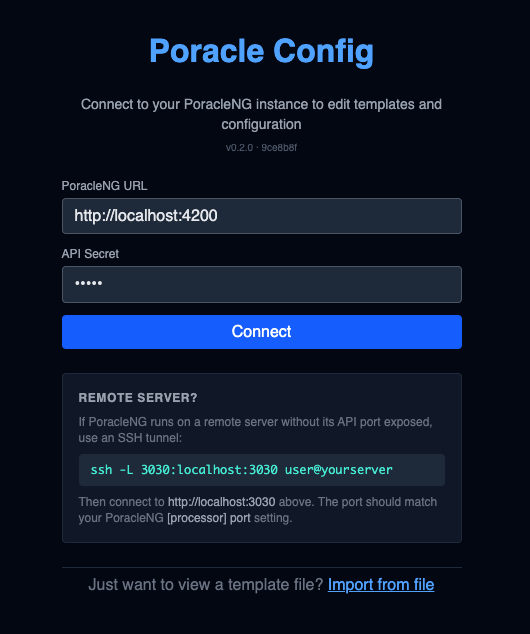
Enter:
| Field | Value |
|---|---|
| PoracleNG URL | The full URL of the processor's API, e.g. http://localhost:3030 |
| API Secret | The api_secret value from [processor] in config.toml |
Click Connect. The UI sends authenticated requests using the X-Poracle-Secret header and fetches your current config and DTS templates.
Remote servers
If PoracleNG is on a remote host and you don't want to expose its API port, forward it over SSH:
Then use http://localhost:3030 in the Config UI. The local port you forward to must match the [processor] port value (default 3030).
Don't expose the API publicly unless you mean to
The API serves all of your PoracleNG configuration and tracking data behind the api_secret. Prefer an SSH tunnel, VPN, or an IP allow-list on your reverse proxy. Setting [processor] host = "0.0.0.0" alone binds the port to every interface.
View a template file without connecting
The Import from file link at the bottom of the connect screen opens a template in read-only/edit mode without touching a live PoracleNG. This is the quickest way to inspect a community-shared dts.json before installing it.
The DTS editor
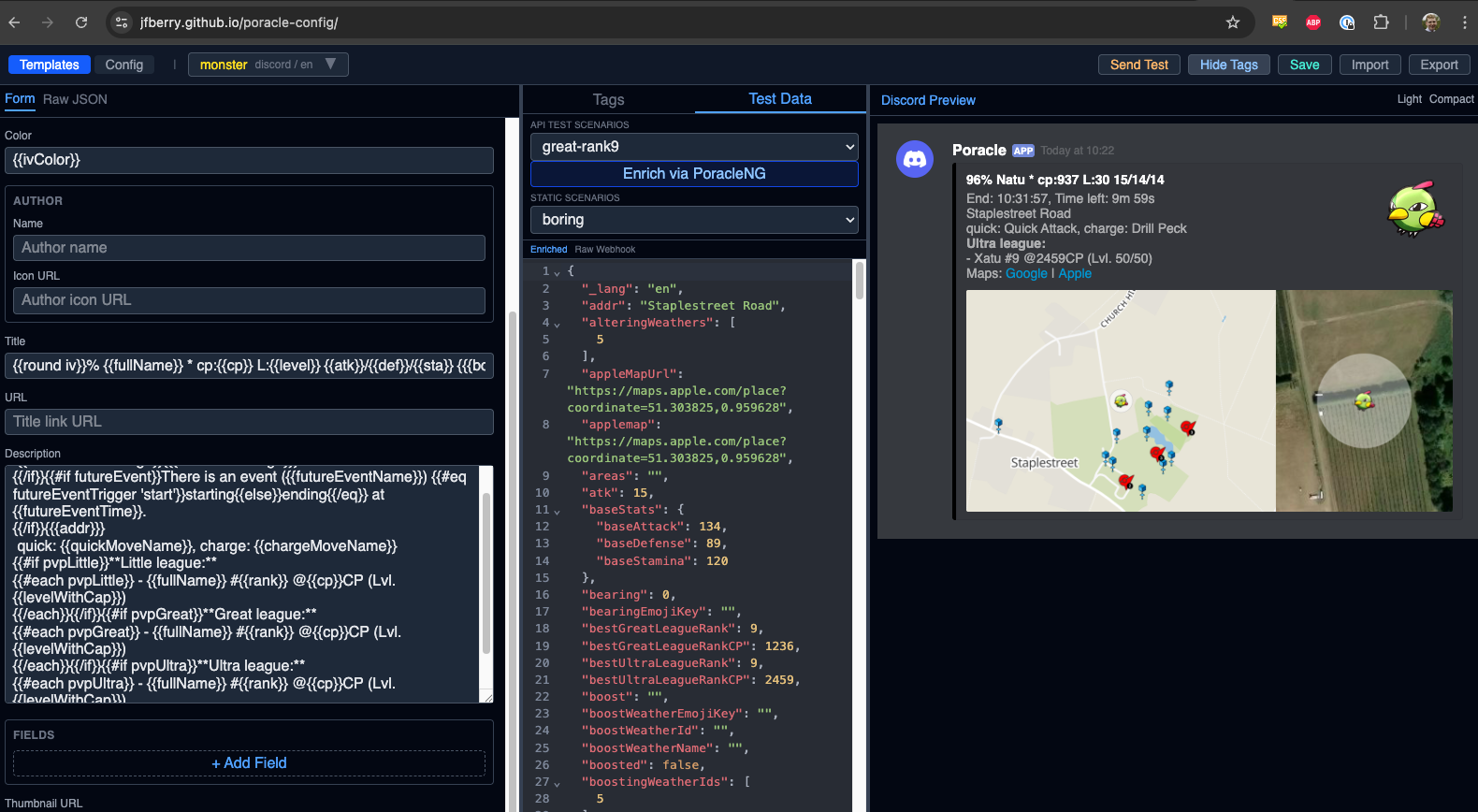
The DTS editor is split into three panes:
| Pane | Purpose |
|---|---|
| Left — fields | Form-based editor for the currently selected template. Each embed/webhook field has its own row with Handlebars syntax highlighted. Use + Add Field to add optional fields to a template. |
| Middle — test data | Pick a test payload from the testdata.json catalog, or use a tag (e.g. great-raid, boring) to filter to a relevant sample. The raw JSON of the selected payload is shown below. |
| Right — Discord preview | Live render of the template using the selected test data, laid out how the message will look in Discord. Telegram previews are also supported. |
Top-right actions:
- Send Test — sends the rendered message to your Discord/Telegram (via PoracleNG) so you can verify the real output in your destination channel, not just in the preview
- Save — writes the edited template back to PoracleNG (
config/dts.json) - Import — load a template from a file on disk (merge or replace existing)
See the full DTS reference
The Config UI helps you edit templates, but it doesn't replace the field reference. See Alert Templates (DTS) for how DTS templates work and what fields are available in each webhook type, and Advanced DTS for partials, per-platform overrides, and helpers.
The auto-create editor
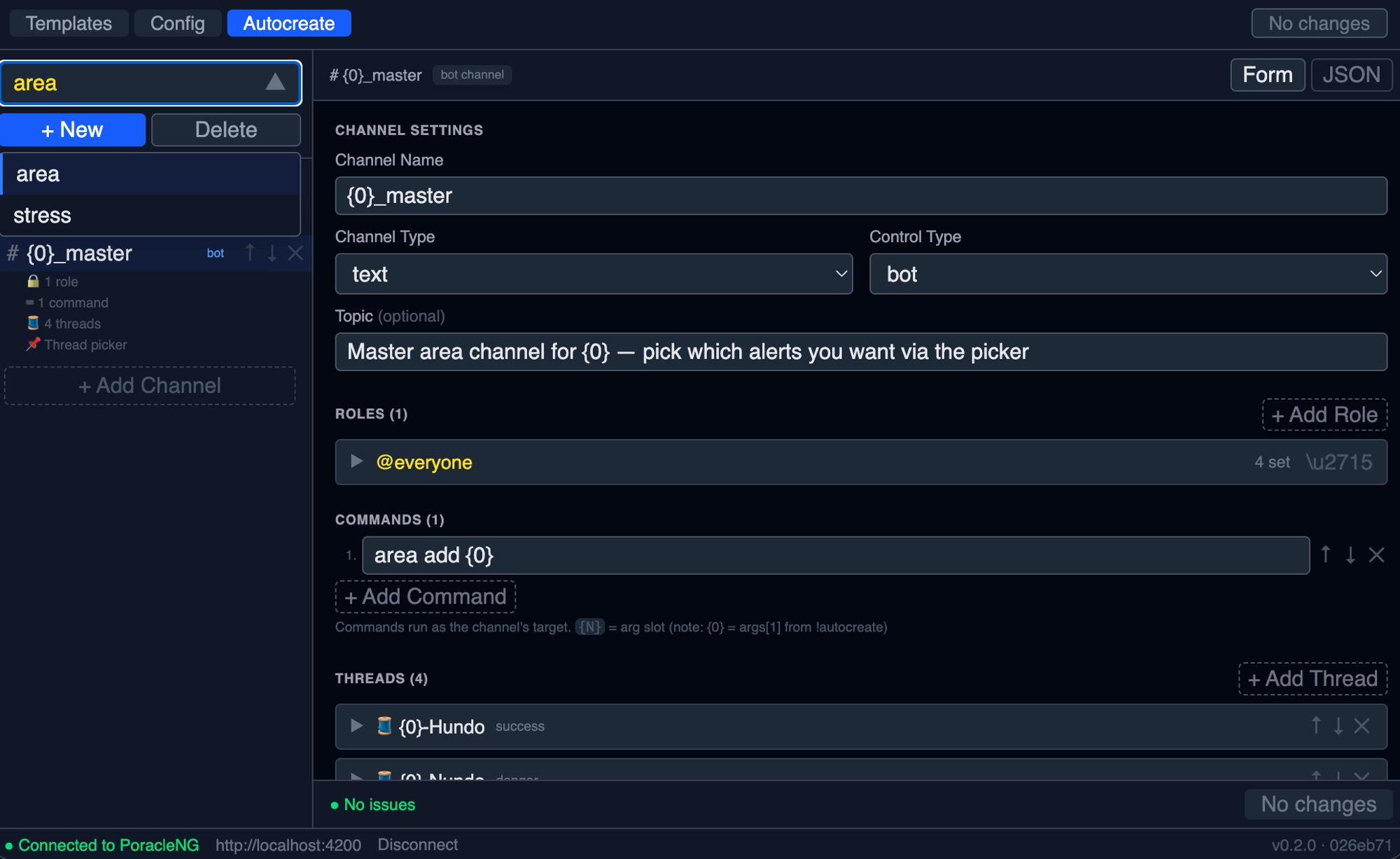
Switch to the Autocreate tab (top-left, alongside Templates and Config) to edit channelTemplate.json. The left pane lists every named template in the file — pick one with the dropdown, + New to add a template, Delete to remove it. Below the dropdown, the selected template renders as a tree of channel nodes, each summarising its role count, command count, threads, and picker. Click a channel to open it in the form on the right.
The right pane is a typed editor for every property documented on the Channel Auto-create page — channelType, controlType, topic, role permission flags, commands, threads (with their button labels and styles), and the thread picker. Tabs in the top-right toggle between the Form view and the raw JSON view of the same template.
A footer status line shows ● No issues when the current template lints clean, and the right-hand No changes / Save indicator tracks unsaved edits.
The editor uses the auto-create REST API to load, validate, and save:
- Validate — runs the same lint as
POST /api/autocreate/templates/validateand surfaces errors inline before you save. - Save — writes back through
POST /api/autocreate/templates. The previous version is snapshotted intoconfig/backups/automatically. - Delete a template — removes a single named template via
DELETE /api/autocreate/templates/:namewithout rewriting the whole array.
Templates edited here can be applied via Discord (!autocreate <name> ...) or driven in bulk through [[autocreate.rules]] in config.toml. The Config UI does not currently trigger a sync from the editor — run !autocreate sync (or call POST /api/autocreate/run) once your template is saved.
The config editor
Switch to the Config tab (top of the left pane) to edit config.toml instead of templates. Each [section] becomes a form group with typed inputs, defaults shown, and links into this documentation.
Save rewrites config/config.toml in place, after backing up the previous version to config/backups/. Settings that can be hot-reloaded take effect immediately; if any changed field needs a restart, the response says so and lists the fields.
The editor deliberately doesn't include [processor], [database] or the Discord/Telegram bot tokens; edit those in config.toml by hand. Other sensitive values (API keys, Koji token, Shlink key) are shown masked as **** and are only changed if you type a new value. That includes the 5.3 [processor] trusted_proxies and enable_pprof keys.
PoracleNG 5.3+: saved values that equal a default
When saving, the editor leaves out any value equal to its schema default. In 5.2.x some schema defaults didn't match the code (for example Telegram enabled, filter_max_rank, removal_safety_max_percent and thread_keep_alive_interval_hours), so saving one of those values deleted the line and the code's different default applied. On 5.2.x, check those keys in config.toml after saving. From 5.3 the schema defaults match the code.
Config UI vs end-user web UIs
The Config UI is an admin tool. It doesn't overlap with the end-user web UIs:
| Tool | Audience | Purpose |
|---|---|---|
| Poracle Config UI (this page) | Operators / admins | Edit config.toml and DTS templates |
| PoracleWeb / PoracleWeb.NET | End users | Manage personal tracking subscriptions (pokemon, raids, areas, profiles) without using bot commands |
All three connect to the same PoracleNG API on port 3030 using the same api_secret, but they manage different parts of the system. You can run them side by side.